
6 Month Advanced Excel & Data Analytics Course in Phagwara
Join the Advanced Excel & Data Analytics Course in Phagwara at TechCADD. Learn Excel formulas, dashboards, data analysis and MIS reporting in 6 months.
Build practical data management, spreadsheet, and analytical skills with the 6 Month Advanced Excel & Data Analytics Course in Phagwara at techcadd Computer Education. This programme is designed for students, graduates, working professionals, and beginners who want to learn how to organise data, analyse business information, create reports, and make informed decisions using modern data tools.
Through structured training and practical exercises, learners can develop confidence in working with spreadsheets, large datasets, business reports, charts, dashboards, and data-driven projects.
Advanced Excel & Data Analytics Course Overview
The course focuses on transforming raw data into meaningful information that supports business planning and decision-making. Students learn essential spreadsheet techniques, advanced formulas, data cleaning, analysis methods, visual reporting, and dashboard creation.
The programme combines theoretical concepts with hands-on practice to help learners understand how Excel and data analytics are used in offices, businesses, finance departments, operations, sales, and management.
What You Will Learn
Advanced Excel Skills
Learn spreadsheet management, professional formatting, advanced formulas, logical functions, lookup functions, conditional formatting, data validation, sorting, filtering, and efficient data organisation. Understand how to work with large worksheets and improve accuracy when handling business information.
Data Cleaning and Preparation
Learn how to identify duplicate records, handle missing or inconsistent values, organise unstructured information, and prepare datasets for analysis. Develop good practices for maintaining accurate and reliable data.
Data Analysis Techniques
Understand how to summarise datasets, compare performance, identify patterns, calculate key business metrics, and interpret information. Practise using PivotTables, PivotCharts, lookup functions, and other Excel features to analyse data efficiently.
Reports, Charts and Dashboards
Create clear business reports, visual charts, interactive dashboards, and summary sheets. Learn how to present complex information in a simple format that helps managers and teams understand business performance.
Business Data Applications
Explore practical examples related to sales analysis, inventory tracking, financial summaries, customer records, employee data, and performance reporting. Understand how analytical skills can support everyday business operations.
Practical Projects
Apply your learning through guided exercises and project-based assignments. Build sample Excel reports, data analysis sheets, interactive dashboards, and business performance summaries that demonstrate your practical skills.
Who Can Join This Course?
This course is suitable for students, graduates, job seekers, office assistants, accountants, business professionals, entrepreneurs, and anyone interested in improving their Excel and data analysis skills. Beginners can start with spreadsheet fundamentals before progressing to advanced functions and analytical techniques.
Career Opportunities
After developing relevant practical skills, learners can explore entry-level opportunities such as:
Advanced Excel Executive
MIS Executive
Data Analyst Trainee
Reporting Executive
Business Operations Executive
Data Management Executive
Junior Business Analyst
Career opportunities depend on individual skills, project experience, qualifications, and employer requirements.
Why Choose techcadd in Phagwara?
techcadd focuses on practical, career-oriented computer education. Learners can develop their skills through guided instruction, hands-on spreadsheet exercises, real-world business examples, and project-based practice. The training is designed to help students build confidence in using data tools for professional tasks.
Start Your Learning Journey
Take the next step towards developing valuable spreadsheet and analytical skills with the 6 Month Advanced Excel & Data Analytics Course in Phagwara. Contact techcadd Computer Education to enquire about the current batch schedule, course fees, practical training details, and admission process.
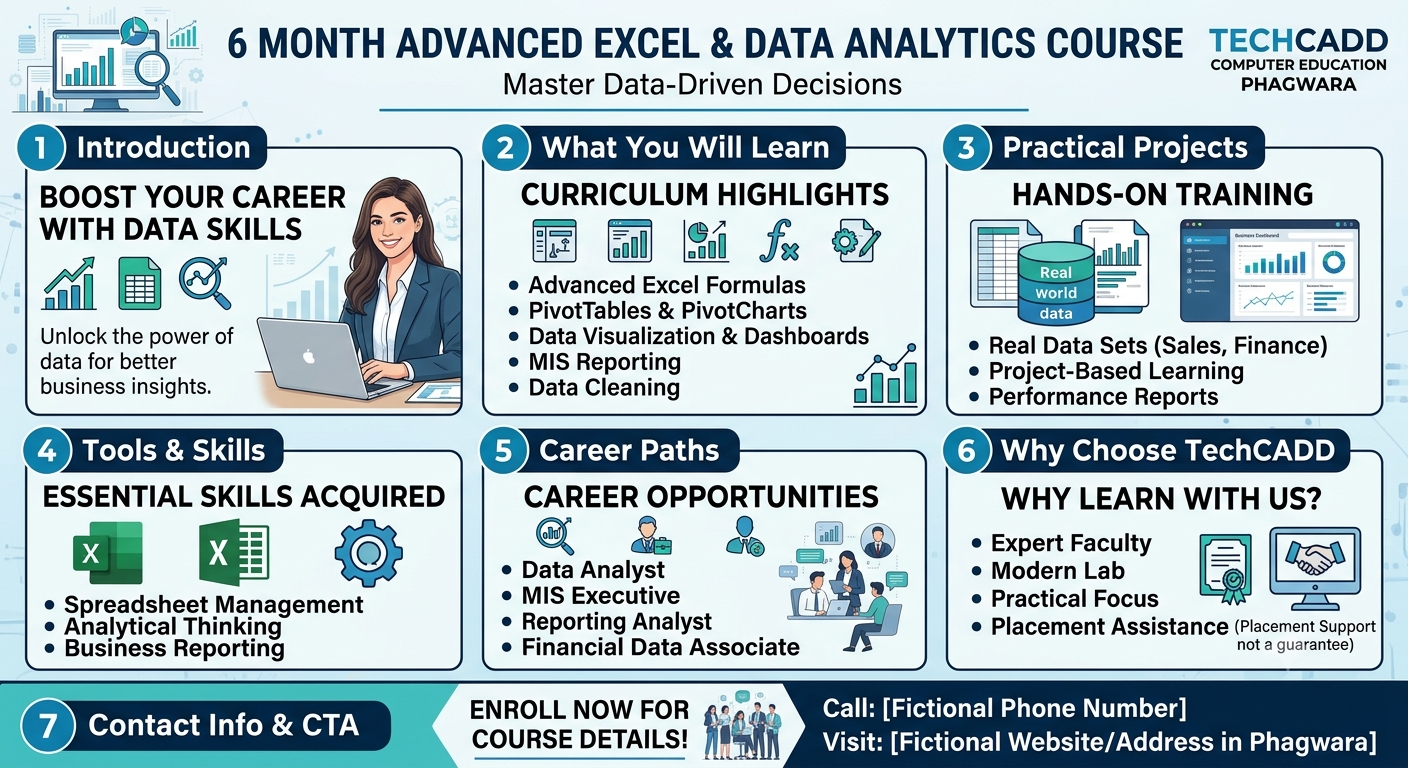
Take the next step toward your professional goals with the 6 Month Advanced Excel & Data Analytics Course in Phagwara at techcadd . This comprehensive training program is designed for students, graduates, freshers, job seekers, and working professionals who want to improve their spreadsheet management, analytical thinking, reporting, and data interpretation skills.
In today's business environment, organizations use data to track performance, manage operations, monitor expenses, understand customer behavior, and make informed decisions. Advanced Excel and data analytics skills can help professionals organize large amounts of information, identify useful patterns, prepare accurate reports, and present findings clearly.
This course combines structured learning with practical exercises to help you understand how Excel and data analysis techniques are used in everyday business situations.
Learn Advanced Microsoft Excel
Build a strong understanding of Microsoft Excel and explore features that help you work more efficiently with spreadsheets. Learn advanced formulas and functions, logical calculations, lookup functions, conditional formatting, data validation, sorting, filtering, and spreadsheet organization.
Understand how to use formulas to calculate totals, compare information, identify errors, and summarize large datasets. Develop the ability to create organized spreadsheets that are easier to maintain, update, and interpret.
Understand Data Cleaning and Preparation
Accurate analysis begins with well-organized data. Learn how to identify duplicate entries, correct inconsistent formatting, handle missing information, standardize records, and prepare datasets for reporting.
Practice organizing raw information into structured tables that can be used for calculations, comparisons, summaries, and visualizations. These skills are useful when working with customer records, sales transactions, inventory information, employee data, and financial reports.
Master PivotTables, Charts, and Data Analysis
Explore PivotTables and PivotCharts to summarize large datasets and compare information across different categories. Learn how to filter records, group data, calculate totals, and identify patterns that may be difficult to notice in unorganized spreadsheets.
Practice analyzing sales performance, monthly expenses, inventory movement, departmental results, and other business information. Learn to present findings using appropriate charts, summaries, and clear reporting formats.
Create Professional Dashboards and MIS Reports
Learn how to turn spreadsheet data into meaningful visual reports. Develop dashboards containing charts, summary tables, key performance indicators, and important business figures.
Understand how management information system (MIS) reports help businesses monitor progress, review performance, and support operational decisions. Practice preparing daily, weekly, and monthly reports using realistic business scenarios.
Depending on the tools and modules included in your training, you can also explore data import, transformation, and reporting workflows to improve your understanding of modern data analysis processes.
Gain Practical Experience Through Projects
Apply your learning through guided assignments and industry-oriented practice projects. Work with sample datasets to prepare sales performance reports, expense summaries, stock and inventory reports, employee attendance records, customer analysis sheets, and business dashboards.
These exercises help you connect theoretical concepts with practical tasks, improve accuracy, solve spreadsheet problems, and develop confidence when presenting data. You can also organize selected completed projects into a portfolio to demonstrate your skills to prospective employers.
Who Can Join This Course?
The program is suitable for students who want to develop practical computer skills, graduates preparing for employment, freshers seeking office-based opportunities, professionals who want to improve their reporting abilities, accountants who work with spreadsheets, and business owners who need to understand their business data.
Beginners can develop their knowledge step by step, while learners with existing Excel experience can strengthen their understanding of advanced spreadsheet functions and reporting techniques.
Career Opportunities After Training
Advanced Excel and data analytics knowledge can support applications for relevant entry-level roles, depending on your educational background, practical skills, and employer requirements. Potential career paths include Advanced Excel Executive, MIS Executive, Reporting Executive, Data Analyst Trainee, Operations Executive, Sales Reporting Executive, and Data Management Assistant.
Employers may look for candidates who can maintain accurate records, prepare reports, analyze information, communicate findings, and work confidently with spreadsheet tools. Building practical projects and continuing to develop your analytical abilities can help you prepare for these responsibilities.
Why Choose techcadd in Phagwara?
At techcadd Computer Education, the course is designed around practical skill development, structured instruction, guided exercises, and business-oriented applications. The aim is to help learners understand not only how Excel features work, but also when and why to use them for reporting and analysis.
Through consistent practice, learners can improve spreadsheet accuracy, data organization, analytical thinking, dashboard creation, and professional reporting skills. These capabilities can be valuable across administration, accounting support, sales, operations, and other data-focused business functions.
Start Building Your Data Skills
If you want to improve your Excel knowledge, learn to prepare professional reports, and understand how businesses use data, the 6 Month Advanced Excel & Data Analytics Course in Phagwara can be a useful step in your learning journey.
Contact techcadd Computer Education to learn more about the course curriculum, training schedule, practical assignments, and admission process. Begin developing the skills needed to work more confidently with spreadsheets, business information, and data-driven tasks.